BOSS RC-505 | Course
Everything you NEED to KNOW about the BOSS RC-505 Loop Station
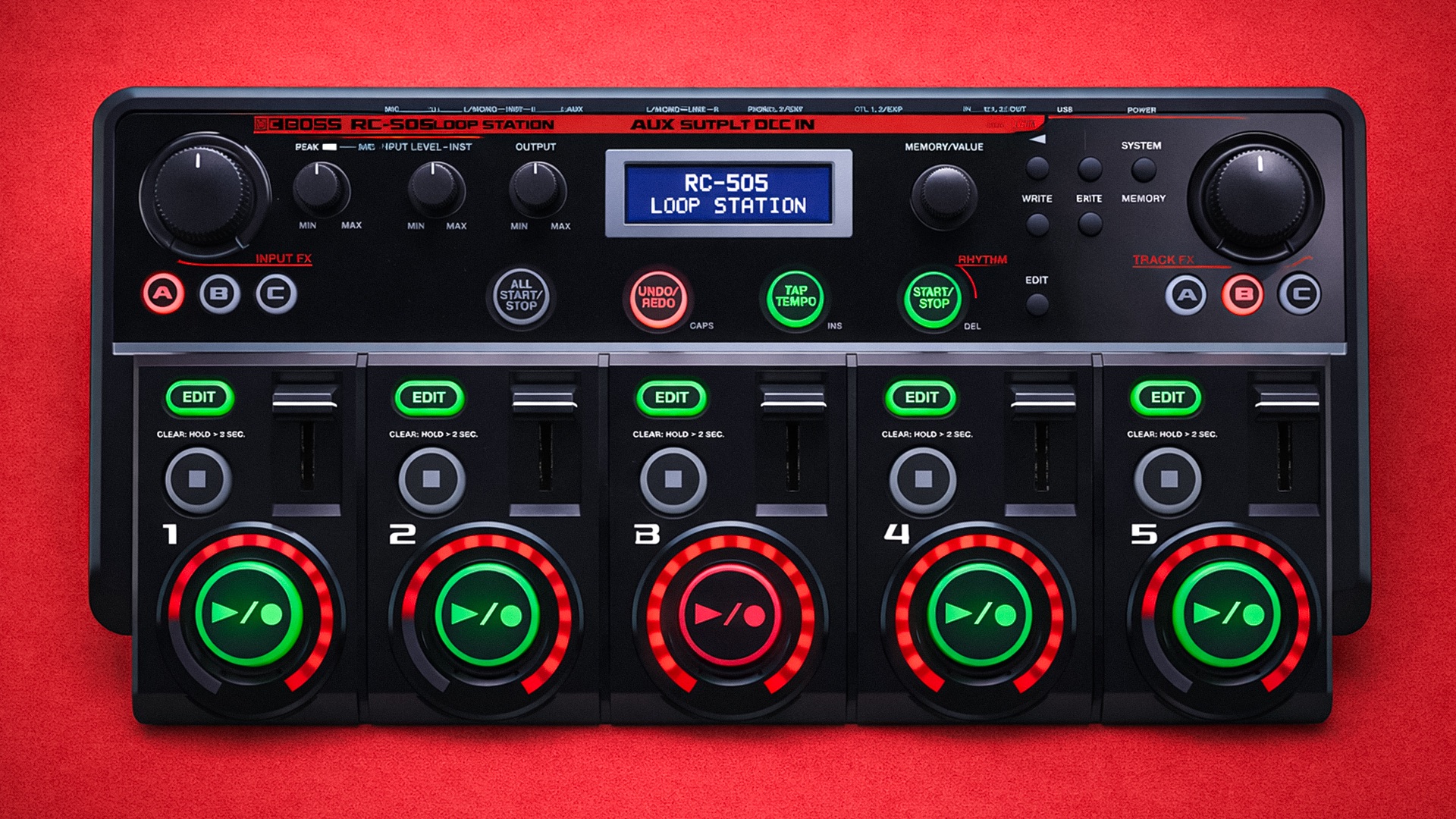
Skip the boring manual and jump straight into making music with this hands-on online course. This course is built specifically for the BOSS RC-505 (Mark I) and shows you how to use it as a real performance instrument not just for beatboxing, but also multi-instrumentalist and guitar players! If you’ve ever felt like you were only using half of what it can do, this is where that changes.
We’ll cover the firmware 2.0 update in depth and why the module system is a total game-changer. You’ll learn how to take advantage of the expanded effects architecture, smarter routing, and deeper control that firmware 2.0 unlocked features many users still overlook.
You’ll master five-track control, input and effects management, rhythm use, MIDI basics, and proven live-performance workflows that keep things tight and musical. No filler, no menu-diving for its own sake just practical guidance that makes the RC-505 faster, more flexible, and far more powerful than most people realise.
By the end, the RC-505 won’t feel dated or limited it’ll feel modern, expressive, and fully under your control.

IMMEDIATE ACCESS
Start instantly. Get full access the moment
you check out. No waiting, no delays.

14 DAY GUARANTEE
Try it risk-free. If you’re not satisfied within 14 days, we’ll give you a full refund.
✅ Used by thousands of
musicians worldwide

SECURE PURCHASE
Safe & encrypted payments. Your information is protected with industry-standard security.
A Simple Guide To BOSS RC-505
-
Introduction
1 lesson- Aims and Objectives - Welcome to the Course
-
Basic Operation
3 lessons- Main Features and Overview of the BOSS RC-505
- Connections - The Back Panel
- Expanding the BOSS RC-505 Inputs
-
Saving Memory Banks
5 lessons- Saving a Phrase Memory (Write, Rename, Copy and Paste)
- Exchanging Phrase Memories (Set Rearrange)
- Copy Track
- Creating and Loading User Sets (Frequently Used Settings)
- Deleting a Phrase Memory
-
Track 1-5 Settings
9 lessons- Playing a Track Backwards (Reverse)
- Adjusting Playback Level (Play Level)
- Adjusting Track Position (Pan)
- Track Play Modes - One Shot
- Track FX Toggle
- Play Modes - Multi vs Single
- Track Start/Stop Modes
- Loop Measures
- Loop and Tempo Sync
-
Firmware 2.0 Features
2 lessons- What's NEW in Firmware 2.0!?
- Looping to a METRONOME with the BOSS RC-505 setup! How to run the on board CLICK TRACK!
-
Phrase Memory Settings
11 lessons- Phrase Memory Volume (Memory Level)
- Phrase Memory Tempo
- Compression and Reverb
- Overdub Modes - Track Replace
- Track Record Modes
- Single Play Change
- Loop Quantize
- Loop Length
- Loop Select Part 1 - All Start Select
- Loop Select Part 2 - All Stop Select
- External Foot Controller Setup - Assign Controls
-
Rhythm Settings
6 lessons- Lineout and Output Level Select - Output Settings
- Rhythm Patterns
- Time Signatures
- Record Count
- Play Count
- Stop Modes
-
System Settings
9 lessons- Layout - LCD Contrast and Display Options
- Loop Indicators
- Audio Routing Options
- Headphone Track Monitoring - Phones Track Out
- Input Lineout
- Clear Modes - Three Ways to Clear Loop Tracks on the BOSS RC-505!
- Clear All Button Setup (BONUS)
- NS Threshold
- Firmware 2.0 Effects Display
-
Input/Track FX Settings
2 lessons- Applying Multi-Effects and FX Compatibility
- Switching out Effects and adjusting Parameters
-
Connecting BOSS RC-505 to your Computer (USB Modes)
5 lessons- Backing Up and Importing Samples on BOSS RC-505 - Mass Storage
- Installing USB Driver for BOSS RC-505
- BOSS RC-505 Live Stream Setup with OBS
- What is Audio/MIDI Mode on the BOSS RC-505?
- Routing MULTIPLE INSTRUMENTS via USB to the BOSS RC-505 using Ableton Live!
-
RC-505 MIDI Settings
5 lessons- External Clock Sync Part 1 - MIDI Slave Ableton Live to BOSS RC-505 MIDI Clock!
- External Clock Sync Part 2 - MIDI Slave BOSS RC-505 to Ableton Live MIDI Clock!
- How to setup External MIDI Foot Controllers with the BOSS RC-505!
- Nektar Pacer - LED Lights Setup Custom Colours (BONUS)
- Nektar Pacer - Preset Bank Switches Setup (BONUS)
-
Final Thoughts
2 lessons- Thanks for Watching!
- Leave a Review